
API Design First with OpenAPI: Generating Kotlin and TypeScript Types from a Single Contract

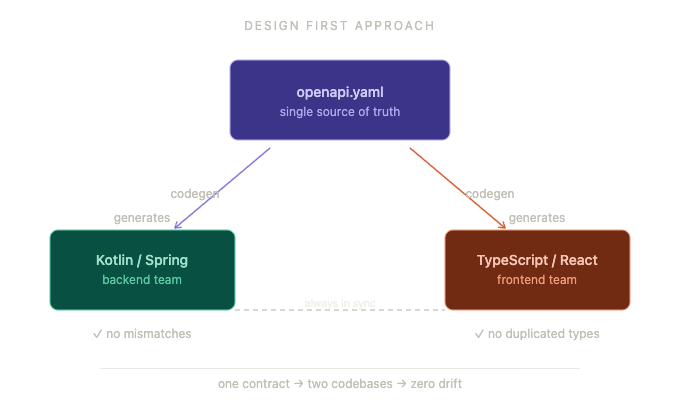
Starting a new API project often involves juggling multiple technologies and teams. Backend developers build the API, frontend developers consume it, and both sides need to stay in sync. This can lead to mismatches, duplicated effort, and bugs. A Design First approach using OpenAPI offers a clear solution: define the API contract upfront, then generate code for different platforms from that single source of truth. This post explores how to use OpenAPI to generate Kotlin and TypeScript types from the same contract, improving consistency and speeding up development.
What is API Design First with OpenAPI?
API Design First means writing the API specification before any code. The OpenAPI Specification (OAS) is a widely adopted standard for describing RESTful APIs in a machine-readable format, usually YAML or JSON. It defines endpoints, request and response schemas, authentication, and more.
This approach contrasts with Code First, where developers write backend code first and generate API documentation afterward. Design First encourages collaboration between frontend and backend teams early, reduces misunderstandings, and creates a contract that both sides trust.
Benefits of Generating Kotlin and TypeScript Types from One Contract
When the API contract is the single source of truth, generating client and server code from it offers several advantages:
Consistency: Both Kotlin backend and TypeScript frontend use the same data models, reducing bugs caused by mismatched types.
Speed: Developers avoid manual type definitions and repetitive work.
Maintainability: Changes in the API contract propagate automatically to generated types.
Collaboration: Teams share a clear, agreed-upon contract.
Using OpenAPI, you can generate Kotlin data classes for backend services and TypeScript interfaces or types for frontend applications from the same specification file.
Setting Up OpenAPI for Your Project
Start by writing your OpenAPI specification. Here is a simple example defining a `User` object and a `/users` endpoint:
```yaml
openapi: 3.0.3
info:
title: User API
version: 1.0.0
paths:
/users:
get:
summary: Get all users
responses:
'200':
description: A list of users
content:
application/json:
schema:
type: array
items:
$ref: '#/components/schemas/User'
components:
schemas:
User:
type: object
properties:
id:
type: integer
format: int64
username:
type: string
email:
type: string
required:
- id
- username
```
This contract defines the shape of the data and the API behavior clearly.
Generating Kotlin Types with OpenAPI Generator
The OpenAPI Generator is a popular tool that supports many languages, including Kotlin. To generate Kotlin data classes:
Install OpenAPI Generator CLI:
```bash
npm install @openapitools/openapi-generator-cli -g
```
Run the generator with Kotlin client or server options:
```bash
openapi-generator-cli generate -i user-api.yaml -g kotlin --library jvm-retrofit2 -o kotlin-client
```
This command generates Kotlin classes representing the API models and client code to call the API.
You can customize the output by configuring the generator with options like package names, serialization libraries (e.g., Moshi, Gson), and more.
Generating TypeScript Types with OpenAPI Generator
Similarly, generate TypeScript types for frontend use:
```bash
openapi-generator-cli generate -i user-api.yaml -g typescript-fetch -o ts-client
```
This produces TypeScript interfaces and API call functions using the Fetch API.
Alternatively, you can use other generators like `typescript-axios` or `typescript-angular` depending on your frontend framework.
Integrating Generated Types into Your Workflow
Once generated, import the Kotlin types into your backend codebase and the TypeScript types into your frontend project. This ensures both sides use the same data structures.
For example, in Kotlin:
```kotlin
val users: List<User> = api.getUsers()
```
In TypeScript:
```typescript
import { User, UsersApi } from './ts-client';
const api = new UsersApi();
api.getUsers().then((users: User[]) => {
console.log(users);
});
```
When the API contract changes, regenerate the types and update your code accordingly. This reduces manual synchronization work.

Tips for Effective API Design First with OpenAPI
Keep the contract clear and simple: Avoid overly complex schemas that are hard to maintain.
Use reusable components: Define common schemas in `components` to avoid duplication.
Validate your OpenAPI file: Use tools like Swagger Editor or Spectral to catch errors early.
Automate generation: Integrate code generation into your build or CI pipeline.
Document well: Add descriptions and examples in the OpenAPI file to help all teams understand the API.
Challenges and How to Overcome Them
Some teams hesitate to adopt Design First due to perceived overhead or unfamiliarity. Here are common challenges and solutions:
Learning curve: Start with small APIs and gradually expand. Use online editors and tools.
Tooling issues: Choose stable generators and keep them updated.
Contract disagreements: Use the OpenAPI file as a communication tool to align teams.
Customization needs: Explore generator templates to tailor output.
With practice, Design First becomes a natural part of the development process.

Final Thoughts on Using OpenAPI for Kotlin and TypeScript Types
Using OpenAPI to generate Kotlin and TypeScript types from a single contract brings clarity and efficiency to API development. It reduces errors, saves time, and improves collaboration between backend and frontend teams. Developers and recruiters alike benefit from this approach, as it promotes clean, maintainable code and clear communication.
Teams ready to adopt API Design First should start by writing clear OpenAPI specifications and integrating code generation into their workflows. This practice leads to stronger, more reliable APIs and smoother project delivery.


Comentários